

JumpServer is an open-source PAM (Privileged Access Management) platform that routes every privileged connection to servers, databases, network devices and Kubernetes clusters through a single web-based gateway (bastion host), records each session as video and audits it. With more than 30,000 GitHub stars, over 500,000 deployments worldwide according to the vendor, and more than a decade of production use, it is the most widely used open-source PAM solution.
Privileged accounts (root, Administrator, database administrators, network device admin accounts) are attackers' number one target. Shared passwords, permanent VPN access for suppliers, and no answer to "who connected to which server, when, and ran which command?" are serious risks for both security and audits. At Kinetik Bilişim we deploy and harden JumpServer, design your access policies, and manage migrations from commercial PAM products such as CyberArk.
Short answer: For organizations that cannot justify the cost of CyberArk, BeyondTrust or Delinea but still have to prove privileged access control in ISO 27001, PCI DSS, KVKK (Türkiye's data protection law) or banking audits, JumpServer delivers session recording, command auditing, a password vault and automatic password rotation on your own infrastructure, as open source. It is up and running in about 30 minutes with Docker.
JumpServer's 4A Model: Authentication, Authorization, Account Management, Audit
JumpServer builds the bastion host on four pillars (4A). The images below summarize how each pillar works.
1. Authentication
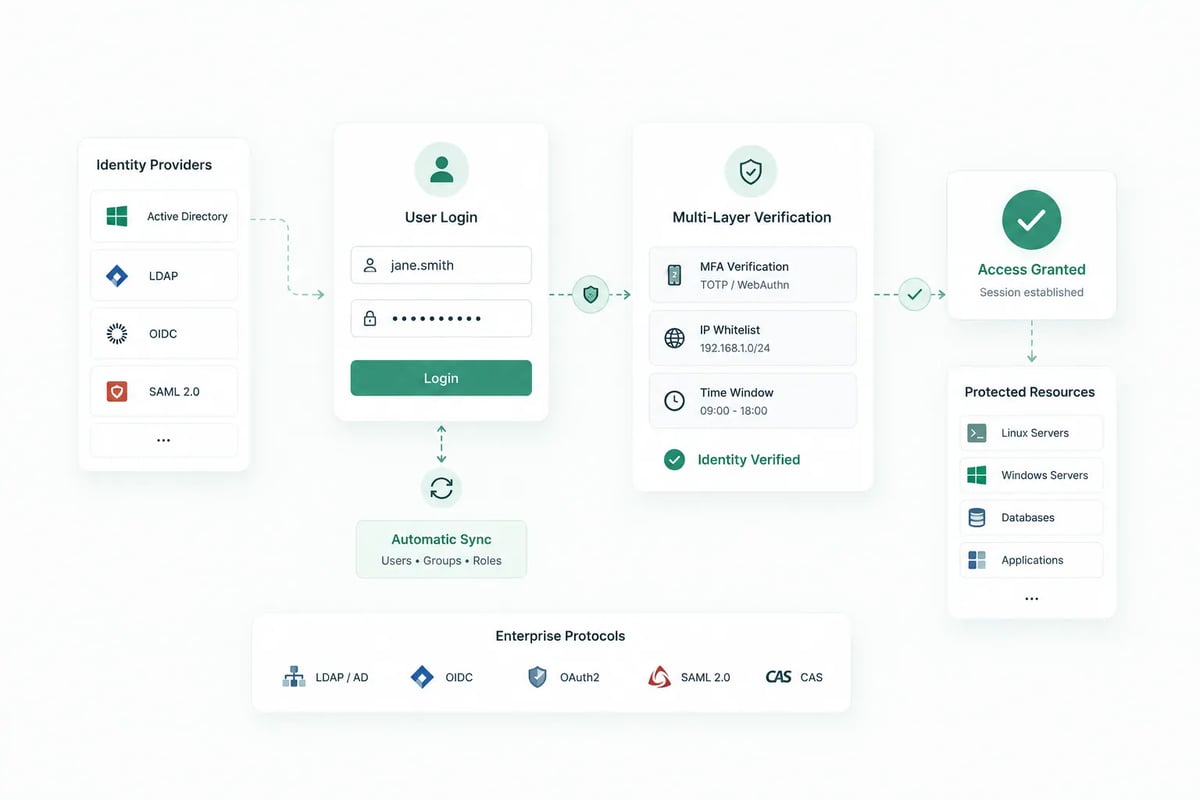
- LDAP / Active Directory integration and user synchronization
- Single sign-on with OIDC, OAuth2 and SAML 2.0; CAS, passkey and WebAuthn
- TOTP-based multi-factor authentication (MFA)
- Enterprise edition: RADIUS, highly available LDAP and enterprise messaging integration
2. Authorization
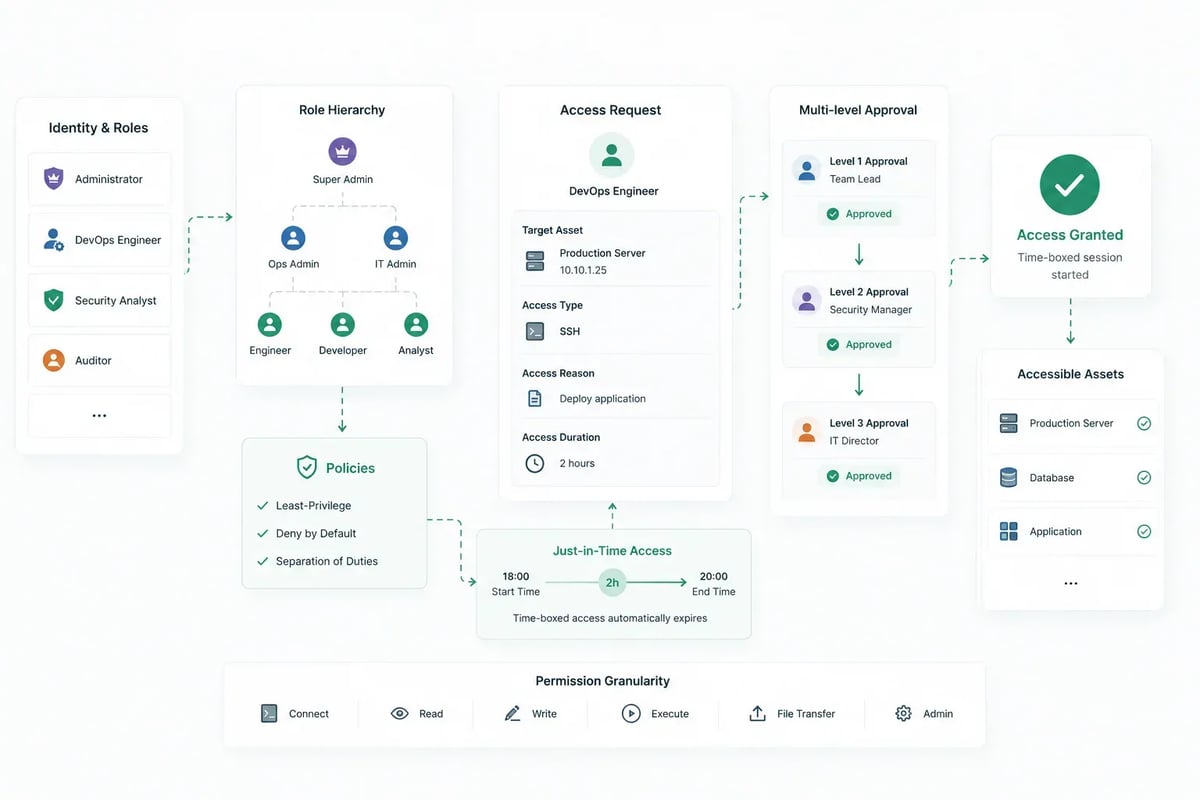
- Role-based access control (RBAC) with custom roles
- Just-in-time (JIT) access: permissions are granted when needed and revoked automatically when they expire
- Access rules (ACL) by IP, protocol, time window and command
- Enterprise edition: multi-tenant organization isolation and a request/approval workflow
3. Account Management
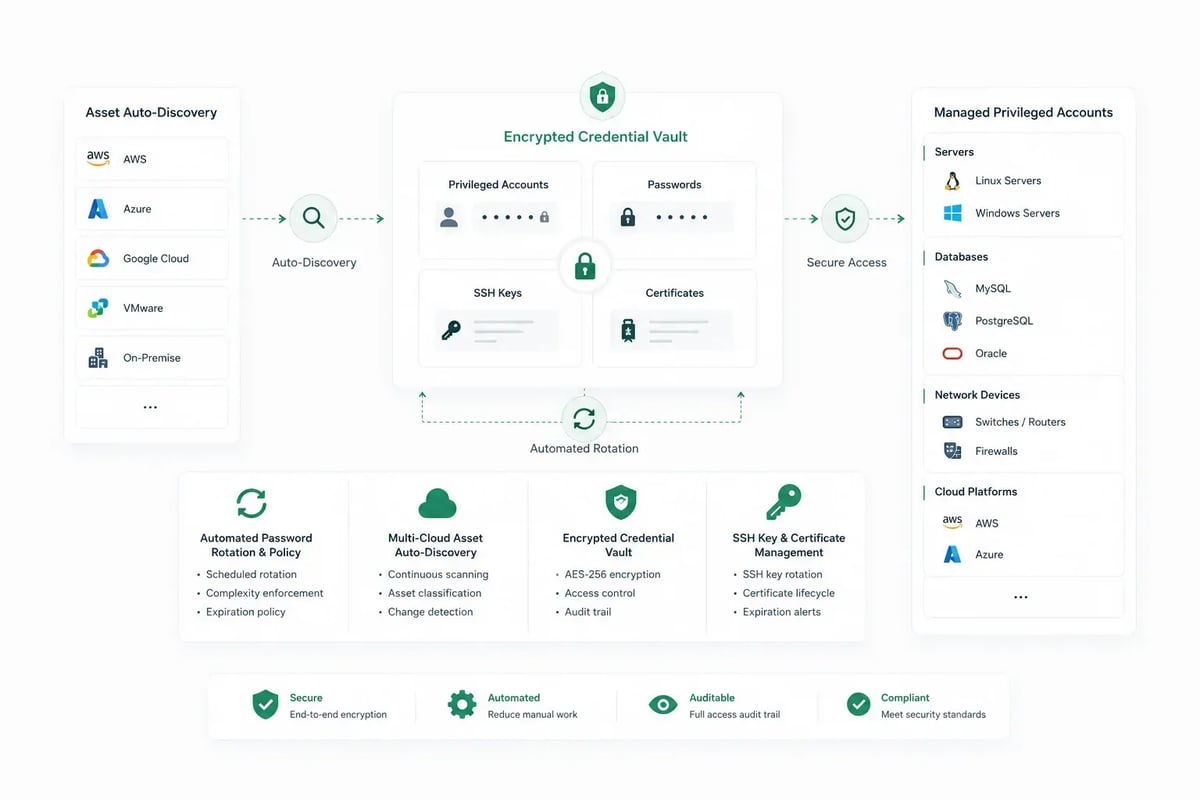
- Automatic discovery and collection of privileged accounts on assets
- Scheduled password rotation and password expiry enforcement
- Encrypted credential backup and recovery; automatic account push to assets
- Enterprise edition: automatic synchronization of AWS, Azure and Google Cloud assets
4. Audit
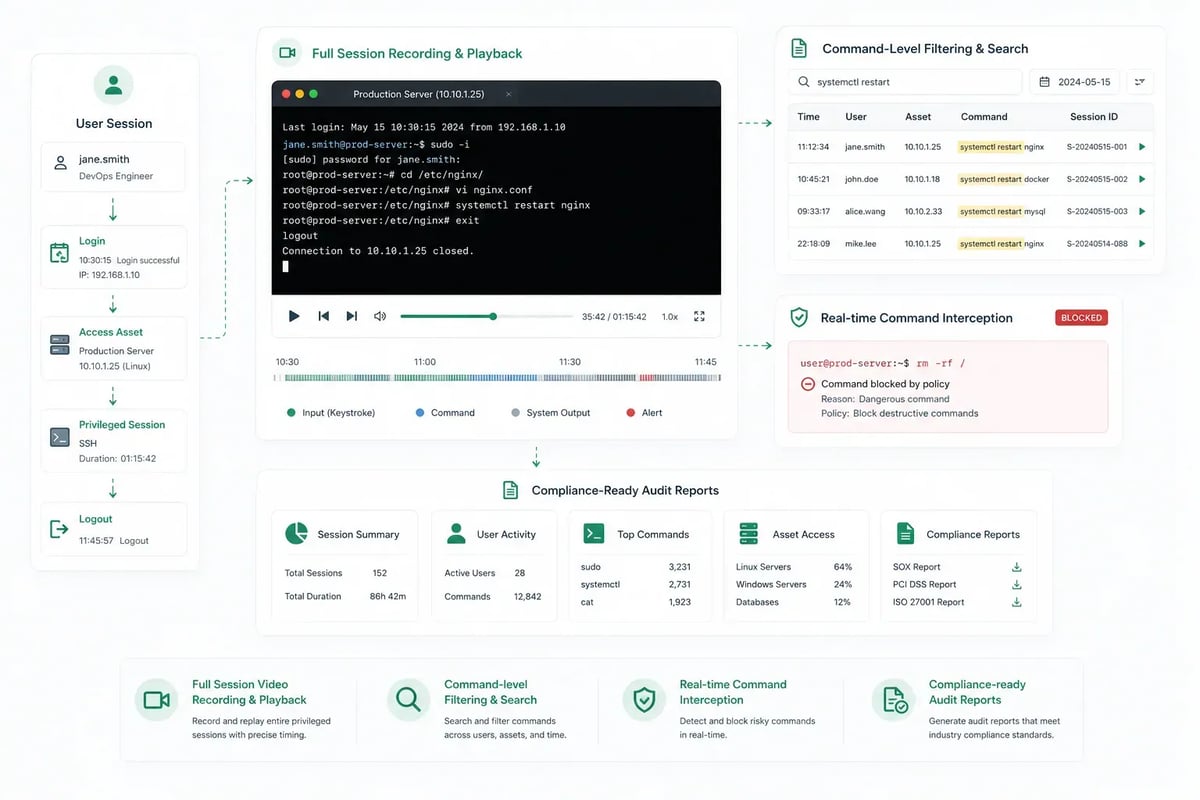
- SSH, RDP and database sessions recorded as video and command streams, with playback
- Live session monitoring and forced disconnect
- Command, file transfer and login logs
- SIEM integration over syslog (e.g. Wazuh, Splunk, Elasticsearch)
JumpServer vs CyberArk vs BeyondTrust vs Teleport
How the four most frequently compared PAM solutions differ. The table is based on the vendors' published comparison pages and our own field experience; commercial pricing varies by organization and scope.
| Criterion | JumpServer | CyberArk | BeyondTrust | Teleport |
|---|---|---|---|---|
| License | Open source (GPL-3.0); free Community, scale-based Enterprise | Commercial, closed source | Commercial, per module | Open core; many features in Enterprise/Cloud |
| Deployment time | About 30 minutes with Docker | Typically 6–12 weeks with a certified partner | Appliance or SaaS | Fast; certificate infrastructure must be designed |
| Components | Single container stack + database and Redis | 7+ components (PVWA, CPM, PSM, etc.) | Depends on product family | Proxy + agents |
| Where is the data kept? | Entirely on your infrastructure | Depends on deployment model | Vendor cloud or on-premises | Your infrastructure or Teleport Cloud |
| SSH, RDP, databases, Kubernetes | ✓ | ✓ | ✓ | ✓ (limited Windows desktop support) |
| Session video recording | ✓ included in the free edition | ✓ | ✓ | Session logs; limited in the free edition |
| Password vault and automatic rotation | ✓ | ✓ | ✓ | Certificate-based; no vault |
| Privilege management on end-user PCs (EPM) | — (out of scope) | ✓ (separate module) | ✓ | — |
| Best fit | Mixed Linux, Windows, database and network enterprise infrastructure | Large, heavily regulated enterprises | Organizations that also need endpoint privilege management | Cloud-native, Kubernetes-heavy teams |
Our assessment: For most organizations that want to bring access to servers, databases and network devices under control, JumpServer delivers the core functions of commercial PAM products (session recording, password vault, approved access) at a much lower total cost. Removing local admin rights on end-user computers (EPM) is a separate need; for it we position JumpServer alongside Intune Endpoint Privilege Management or a similar solution.
Community Edition vs Enterprise Edition
| Feature | Community Edition | Enterprise Edition |
|---|---|---|
| License | GPL-3.0, free | Commercial subscription by scale (14-day trial) |
| SSH, RDP, VNC, database and Kubernetes access | ✓ | ✓ |
| Session recording, command and file audit | ✓ | ✓ |
| LDAP/AD, SSO (OIDC, SAML), TOTP MFA | ✓ | ✓ |
| RBAC, JIT access, command filtering | ✓ | ✓ |
| Account discovery, password rotation | ✓ | ✓ |
| Multiple organizations (multi-tenancy) | — | ✓ |
| Request and approval workflows | — | ✓ |
| RADIUS, highly available LDAP | — | ✓ |
| Cloud asset sync (AWS, Azure, GCP) | — | ✓ |
| Hardware appliance option and vendor SLA support | — | ✓ |
Migrating from CyberArk to JumpServer
Assets, users and permissions can be imported via CSV; historical session recordings stay archived in the old system. As the vendor also recommends, we plan a seamless migration with 30–60 days of parallel running: non-critical asset groups first, then supplier access, and production systems last. With CyberArk's acquisition by Palo Alto Networks raising questions about its roadmap and pricing, evaluating this migration has become even more relevant.
Releases and Security Updates
JumpServer's v4 line continues to receive long-term support (LTS) releases, while the new major version v5 brings a rewritten native client and AI assistance inside the bastion host. Because the system every privileged access passes through is itself a high-value target, following the vendor's security bulletins and keeping the version current is critical; as part of our managed service we validate updates in a test environment first.
Kinetik Bilişim JumpServer Services
- Deployment and hardening: Highly available Docker-based deployment, TLS, backups, management interface closed to external access.
- Asset and account inventory: Import of servers, databases and network devices, privileged account discovery and password rotation policies.
- Policy design: Role-based access, time-limited JIT access for suppliers, filters for dangerous commands.
- Migration from commercial PAM: Parallel-run migration from CyberArk, BeyondTrust or Delinea.
- Integration and compliance: Active Directory, MFA and SIEM integration; privileged access evidence for ISO 27001, PCI DSS and KVKK audits.
Frequently Asked Questions
What is JumpServer?
JumpServer is an open-source PAM and bastion host platform that lets privileged users reach servers, databases, network devices and Kubernetes clusters through a single controlled gateway. It records every session, filters commands, stores passwords in a vault and rotates them automatically, and restricts access with policies.
What is a bastion host (jump server)?
A bastion host is a single, hardened and monitored intermediary server that every administrator connection must pass through, with direct access to critical systems closed off. This way, who connected to which system, when, and what they did is recorded centrally.
Can JumpServer replace CyberArk?
For server, database and network device access it covers CyberArk's core functions such as session recording, a password vault, automatic password rotation and approved access, with much faster deployment and a clearly lower total cost. Privilege management on end-user computers (EPM) is outside JumpServer's scope and should be covered by a separate solution.
Is JumpServer free?
JumpServer Community Edition is GPL-3.0 licensed and free; it includes SSH, RDP, VNC, database and Kubernetes access, session recording, LDAP/AD, SSO, MFA, JIT access and password rotation. Multi-tenancy, approval workflows, RADIUS, cloud asset sync and SLA support are in the Enterprise Edition.
How long does a JumpServer deployment take?
A Docker-based single-server installation is running in about 30 minutes. A typical production project including high availability, backups, AD/MFA integration, asset inventory and policy design takes from a few days to a few weeks.
Is JumpServer secure?
JumpServer is actively developed and receives regular security updates; but because every privileged access passes through it, it is itself a high-value target. Running the current LTS release, closing the management interface to the internet, enforcing MFA and following security bulletins are essential.
JumpServer or Teleport?
Teleport stands out in cloud-native, Kubernetes-heavy environments with certificate-based access. JumpServer is the better open-source fit for enterprise environments that mix Linux, Windows RDP, databases and network devices and need a password vault, automatic rotation and video session recording.
Sources
- JumpServer features (4A model)
- JumpServer vs CyberArk
- JumpServer vs BeyondTrust
- JumpServer vs Teleport
- JumpServer pricing (Community and Enterprise)
- JumpServer releases on GitHub
Let's Talk About Your JumpServer Project
Tell us what you need; we will review your current infrastructure together and prepare a roadmap and a quote tailored to you. Book an introductory meeting or call us at +90 850 244 32 97.